Create a support task
-
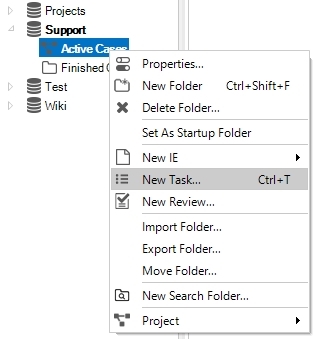
Expand the Support structure type.
-
Right click on Active Cases and select New Task.
-
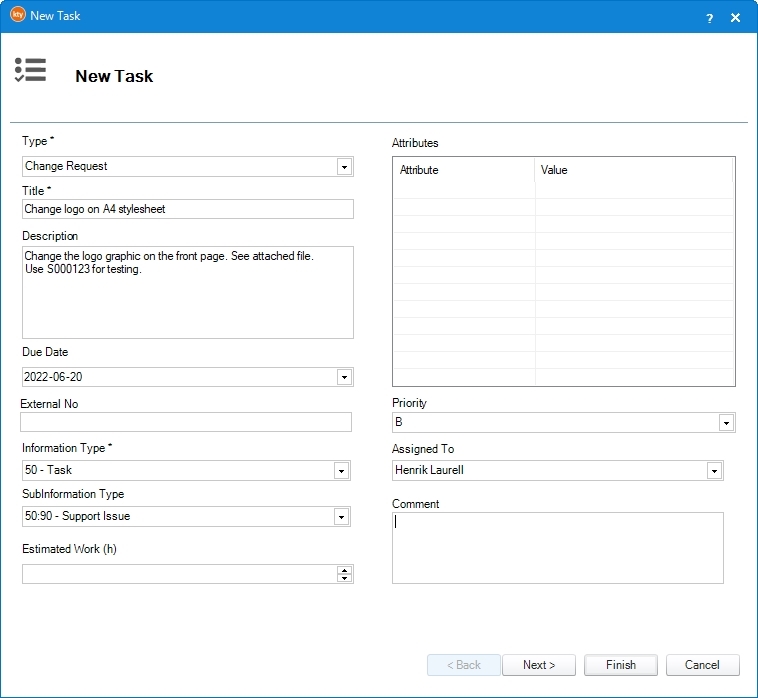
Click Type and select any of the following:
-
Change Request
-
Error Report
-
-
Enter a title.
-
Enter a description.
 note
noteAlways include the ID of a publication/topic for testing, if applicable.
-
Select a due date
(When does the task need to be solved?)
-
Select Task as Information Type.
-
Select Support Issue as SubInformation Type.
-
Select a priority.
(How urgent is the task, and how should it be prioritized against other tasks for the implementation?)
-
Click Finish.
Add attachments to the task if possible to better describe what the problem is/what needs to be done.

|
caution
Never add comments or changes to the task in the TEST or QA environment. All changes must be done in the production environment. |